The Apex Affair - Compfest18 Qualification
So, in this post I will explain the forensic challenge I created for COMPFEST 18. The challenge focuses on how an attacker abuses LOTS (Living Off Trusted Sites) as a command-and-control channel. The idea was inspired by the Spotify as C2 research, which led me to explore how Google Calendar could be abused in a similar way.
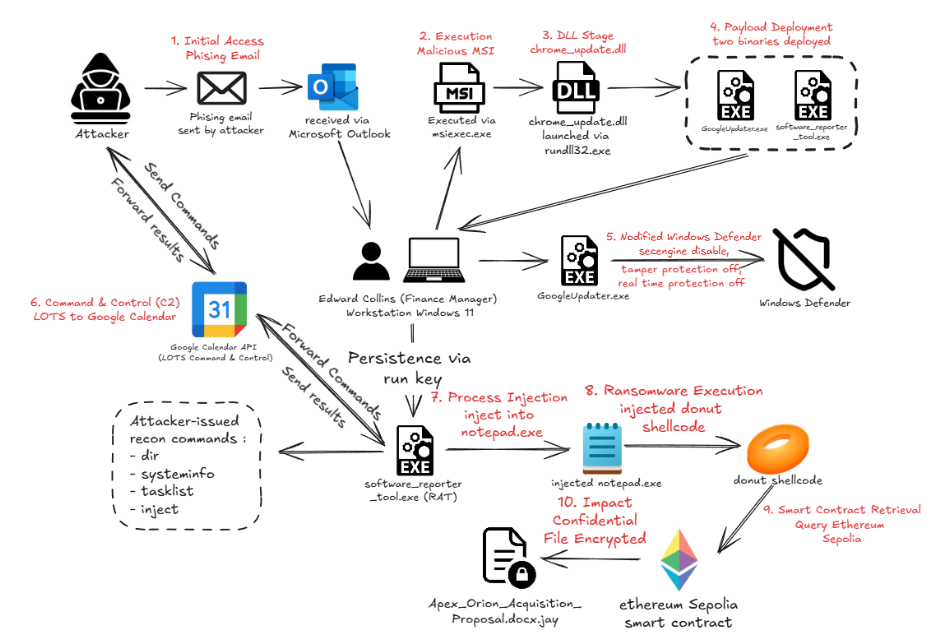 The graph above summarizes the complete two-day attack chain. Throughout this writeup, I will follow the same flow from the initial phishing email, through payload execution and Google Calendar-based C2, to the attacker’s activity on the second day and the final ransomware execution.
Initial Access and Phishing Recovery
Before the attacker could establish this Google Calendar-based C2 channel, they first needed to gain access to the victim’s workstation. The incident began with a phishing email sent by the attacker, who impersonated one of the victim company’s trusted vendors. The email was received by the victim through Microsoft Outlook and delivered a link to an MSI disguised as a legitimate Google Chrome installer.
So, the first thing to understand is how the email itself can be recovered from the disk image. Older versions of Outlook commonly stored mailbox data in OST or PST files (src: https://www.sherlockforensics.com/blog/email-forensics-toolkit-pst-ost-msg-eml.html), but the new Outlook client relies heavily on Chromium-based components and keeps much of its cached data inside IndexedDB, located under the Olk\EBWebView directory (src: https://learn.microsoft.com/en-us/answers/questions/1479356/new-outlook-data-files). By parsing the LevelDB records inside this database, we can reconstruct the phishing email and recover useful artifacts such as the sender, subject, timestamp, and attachment information. From there, the investigation can follow the attack graph by tracing the recovered attachment on disk, identifying its execution, and continuing into the DLL and subsequent payloads dropped by the installer.
After recovering the phishing email, the next step is to follow the malicious attachment and determine what happened after it was executed. The attachment was an MSI package, so instead of treating it as a normal installer, we can inspect its internal tables and custom actions to identify the embedded payload (src: https://intezer.com/blog/how-to-analyze-malicious-msi-installer-files). From there, the execution chain leads to a malicious DLL, chrome_update.dll, which is launched through rundll32.exe.
Defense Evasion and Persistence
The DLL then becomes the next pivot point in the investigation. By correlating file creation and process creation artifacts, we can see that it creates a Defender exclusion and deploys two additional binaries: GoogleUpdater.exe and software_reporter_tool.exe. GoogleUpdater.exe is executed first and uses functionality from the open-source kvc framework to disable the Windows security engine and turn off Tamper Protection and Real-Time Protection.
Under the hood, kvc secengine disable targets several Defender-related components using Image File Execution Options (IFEO) interception together with a vulnerable-driver-assisted process termination mechanism, allowing the security engine to be shut down without requiring a reboot. The full implementation is documented in the project’s README, so I will not go too deeply into it here.
Google Calendar as Command and Control
software_reporter_tool.exe was then configured to persist through the Windows Run Registry, allowing the RAT to start again whenever the user logged in. Once persistence was established, software_reporter_tool.exe began communicating with Google Calendar, which was abused as a Living Off Trusted Sites (LOTS) command-and-control channel. Instead of contacting a dedicated C2 server, the RAT periodically queried calendar events and used specific event fields to exchange data with the attacker. The Summary field was used to identify the compromised host, while the Description field stored the command and its execution result. By reconstructing this behavior, we can then pivot to process creation artifacts and trace the commands that were actually executed through the RAT.
From there, the investigation can move from understanding how the C2 works to reconstructing what the attacker actually executed through it. Since normal commands received from Google Calendar were passed to cmd.exe, process creation artifacts can be used to rebuild the attacker’s command history and follow the intrusion chronologically.
The first attacker-issued reconnaissance command was systeminfo. On the following day, the RAT resumed communication and the attacker continued enumerating the compromised workstation, including its running processes.
Zoom Forensics and DPAPI Recovery
One of the applications observed during this enumeration was Zoom, which was actively being used by the victim during the second day of the incident. This became an interesting forensic pivot because the victim had attended a Zoom meeting shortly before the attacker continued their activity. After the meeting ended, the attacker performed additional reconnaissance and discovered a newly created document inside the victim’s confidential working directory under Documents\Finance\Executive. This suggested that something that occurred during or around the meeting had introduced a new file into the victim’s workflow, making the local Zoom artifacts worth investigating before continuing further along the attack timeline.
Zoom stores several local artifacts under the user’s application data directory, but some of its databases and sensitive values are encrypted. I based this part of the challenge on the approach described in this Zoom Team Chat forensic analysis, which explains how Zoom protects its local data and how its database encryption key can be recovered.
One of the important artifacts is win_osencrypt_key inside Zoom.us.ini. The value contains a ZWOSKEY prefix followed by a Base64-encoded DPAPI-protected blob, meaning that the Zoom database key cannot simply be recovered by reading the configuration file directly. To decrypt it, we first need the DPAPI master key associated with the victim’s Windows profile.
The approach described in the original research recovers the DPAPI master key using the victim’s Windows password. For this challenge, however, I intentionally made that route impractical by using a password that was not reasonably crackable. Fortunately, DPAPI material may still remain in the memory of lsass.exe while the user’s session is active, which provides another recovery path.
Breaking the Easy Volatility Path
Normally, this could be solved rather quickly using the pypykatz-volatility3 plugin, which is capable of extracting DPAPI-related material directly from LSASS through Volatility 3. However, another forensic challenge in COMPFEST 18, developed by Karev, already relied on a similar Volatility-based memory analysis workflow. I wanted this challenge to require a different approach rather than having participants solve another memory objective using essentially the same toolchain.
The idea for this came from Keii’s blog, particularly a WreckIT 6.0 forensic challenge that he created where Volatility was unable to properly analyze the provided Windows memory image, while MemProcFS could still work with it. That gave me the idea of introducing a similar limitation into this challenge without actually destroying the useful memory contents.
Instead of broadly corrupting the dump, I modified a paging-related structure inside the system’s PML4. Volatility 3 relies on several heuristics during its Windows memory bootstrap process to discover the Directory Table Base and construct the virtual-memory translation layer. By invalidating the self-referencing PML4 entry used during this discovery process, Volatility could still recognize the memory image itself, but it could no longer automatically construct the Windows paging layer required by most of its plugins.
The important part was that the dump itself remained largely intact. Process memory, credential material, and other forensic artifacts were still present. Only one of the paging invariants used by Volatility’s automatic DTB discovery had been intentionally broken.
Recovering LSASS with MemProcFS
MemProcFS, however, uses a different approach for Windows memory initialization and was still able to analyze the modified image. This made it the intended alternative path for recovering the LSASS process.
There was one more problem. Recent versions of MemProcFS no longer exposed the LSASS MiniDump in the same way required for this approach. Initially, I thought this recovery method was no longer possible, until I found MemProcFS issue, which showed that the functionality had existed in earlier releases.
That meant the solution was not to find another completely different technique, but rather to identify an older MemProcFS release that still supported the required process dump functionality. I eventually used MemProcFS v5.7, which was able to expose the LSASS MiniDump successfully.
From there, the recovery path becomes straightforward, you could use pypykatz to retrieve the DPAPI master key. That key could then be used to decrypt Zoom’s win_osencrypt_key, giving us the encryption key required to access the local Zoom databases.
After recovering the key and decrypting the Zoom databases, there was one small twist: the specific message I originally expected participants to recover was not actually retained in the local database 😭.
From a realistic incident, that message would have helped explain that a new confidential document had been introduced during the meeting, which would naturally connect the Zoom activity to the file later discovered by the attacker. In practice, however, the challenge questions did not depend on recovering that exact message, so the forensic objective still worked without it.
The important part of this section was the recovery chain itself, identifying Zoom as a forensic pivot, understanding its encrypted local storage, recovering DPAPI material from LSASS, and finally decrypting the application’s local data. Once that was complete, the investigation could return to the attacker’s C2 timeline, where the next stage became significantly more malicious which was process injection.
Process Injection and Payload Recovery
From there, the investigation returns to the RAT’s execution flow. Unlike the previous reconnaissance commands, which were passed to cmd.exe, the RAT contained a separate handler for commands beginning with inject. When such a command was received, the RAT downloaded the supplied payload directly into memory, searched for a running notepad.exe process (which the attacker knew was running from earlier process enumeration), allocated executable memory inside it, copied the payload into that region, and finally started a new thread using CreateRemoteThread.
This behavior could be confirmed from Sysmon Event ID 8, which recorded the remote thread creation from software_reporter_tool.exe into notepad.exe. At that point, the next objective was no longer just identifying the injection itself, but recovering the actual payload that had been placed inside the target process.
Recovering the Injected Payload
Recovering the injected payload turned out to be more difficult than I initially expected. My first assumption was that the HTTP transfer used during the inject command could simply be recovered from the memory image using bulk_extractor, since the RAT downloaded the payload directly over the network before injecting it into notepad.exe.
However, the recovered HTTP data was incomplete and the payload could not be reconstructed cleanly from that source. After the injection, the system continued executing the ransomware, encrypting files, spawning additional processes, and receiving more commands from the attacker, all of which could have caused the relevant memory regions to change.
That failure actually made this part of the challenge more interesting, because there was still another seemingly obvious recovery path, dumping the injected memory region directly from the target notepad.exe process. Since Sysmon had already revealed the remote thread creation and its start address, the injected region should theoretically have been recoverable from the process memory.
Unfortunately, that path failed as well. The targeted Notepad process had already terminated before the memory image was acquired, so its original virtual-memory mappings were no longer reliable enough to recover the injected region cleanly. At that point, the next place to look was the RAT itself. Since software_reporter_tool.exe had downloaded the complete payload into its own address space before copying it into Notepad, another copy of the shellcode could still remain there.
Using MemProcFS, I navigated to the RAT process and used its generated MiniDump as the recovery source. The partial HTTP stream from bulk extractor was still useful here because it revealed two important pieces of information, the first bytes of the payload and the expected Content-Length. Those values could be used as a signature and size constraint to search through the MiniDump for candidate regions that matched the original download.
After carving the matching region, the recovered payload could be validated with Detect It Easy, which identified it as Donut-generated shellcode. From there, the Donut layer could be unpacked to recover the embedded 64-bit Windows executable (I used this tools), which turned out to be the ransomware used in the final stage of the incident.
Ransomware and Blockchain-Based Configuration
By extracting the embedded executable from the Donut shellcode, the final payload could be analyzed directly. Unlike the RAT, which used Google Calendar to receive commands, the ransomware used the Ethereum Sepolia network to retrieve its victim-specific encryption configuration.
The ransomware first generates a unique victim identifier by concatenating the system hostname, MAC address, and MachineGuid, then hashing the result with SHA-256. That victim ID is used as the key when querying the attacker’s smart contract.
The contract itself stores a per-victim structure containing an encryptedSeed, salt, kdfRounds, and an active flag, while values such as the ransomware extension and ransom note are stored globally. The malware queries this state through an eth_call request to the Sepolia RPC endpoint and supplies the victim ID as the function argument.
From the ransomware code, the RPC request is sent to ethereum-sepolia-rpc.publicnode.com, targeting the attacker’s deployed smart contract. The calldata consists of the function selector followed by the 32-byte victim ID. The malware then parses the returned ABI-encoded data into the victim’s encrypted seed, salt, KDF round count, active state, file extension, and ransom note.
This is where the challenge questions about the smart contract address, function selector, and the returned encrypted seed, salt, and KDF rounds naturally come from. Rather than embedding the final encryption material directly inside the malware, the payload only contains the logic required to identify the victim and retrieve the corresponding configuration from the blockchain.
Encryption and Key Derivation
The value returned as encryptedSeed is not used directly as the AES key. The ransomware first derives a mask from SHA256(victimID || salt) and XORs that mask with the encrypted seed to recover the internal master secret.
That master secret is then used as the key for an iterative HMAC-SHA256 derivation. The initial input is based on the victim’s MachineGuid and the salt returned by the smart contract. After the configured number of KDF rounds, the first 16 bytes of the result become the AES key.
The IV is derived separately using HMAC-SHA256 over the exact path of the targeted file. This detail is important because it makes the original file path part of the cryptographic recovery process; even if the other key material is correct, using the wrong path would produce a different IV.
The ransomware specifically targets the document that appeared earlier in the incident timeline: C:\Users\edwar\OneDrive\Documents\Workspace\Finance\Executive\Apex_Orion_Acquisition_Proposal.docx.
Encrypting the Confidential Document
After deriving the AES key and IV, the file is encrypted using AES in CBC mode with block padding. The encrypted copy is written using the extension returned by the smart contract, which in this case is the global .jay extension, and the original document is deleted.
The ransomware also creates a README.txt ransom note in the same Finance\Executive directory. The note content is fetched from the smart contract and dynamically updated with the victim ID before being written to disk.
Recovering the Original Document
At this point, the attack chain had been fully reconstructed, but the forensic objective was not complete yet. The final step was to reverse the ransomware’s key derivation process and recover the original confidential document.
From the previous analysis, we already know the victim-specific configuration returned by the smart contract, including the encrypted seed, salt, and KDF round count. The remaining values required for recovery are the victim’s MachineGuid and the exact original file path, both of which are used by the ransomware during key and IV derivation.
The MachineGuid can be recovered from the Windows registry, while the original path can be reconstructed from the filesystem artifacts. With those values, the same derivation routine used by the ransomware can be reproduced: recover the master secret from the encrypted seed, derive the AES key through the configured HMAC-SHA256 rounds, and derive the IV from the original file path.
Using the reconstructed key and IV, the .jay file can finally be decrypted back into the original Apex_Orion_Acquisition_Proposal.docx. Verifying the recovered document and its hash confirms that the original file was successfully restored.
And with that, the full incident comes together: what started as a phishing email eventually led to a Google Calendar-based RAT, attacker reconnaissance, process injection, and a ransomware payload backed by an Ethereum smart contract.
IOC
Phishing
| Type | Indicator |
|---|---|
| Sender | tech.cloudaxls@gmail.com |
| Reply-To Domain | cloudaxls-tech.com |
| Malicious URL | http://192.168.56.1/googlechromestandaloneenterprise64.msi |
| MSI SHA-256 | 3c1e30040500f4bb55fbd669544949863557b8f7b25bdbce4a9d4ba6cb3264e4 |
Malicious Files
| Type | Indicator |
|---|---|
| Dropped DLL | C:\Users\Public\chrome_update.dll |
| Defender Tool | C:\Program Files\Google\Chrome\GoogleUpdater.exe |
| GoogleUpdater.exe SHA-256 | 192f65c45f72d1221c9c95158fa97093348c620428f2a22b53d4a7f6b67dcb17 |
| RAT | C:\Program Files\Google\Chrome\software_reporter_tool.exe |
| RAT SHA-256 | 520a4c0a8d1349ab9e5c8bc98832198dac2680345ad6e038e172102138a1f79c |
| Injected Shellcode SHA-256 | 9e2413e4d0469a25c7840872f5fa98d93c4bb1c2f9a0d184f47eadaf808fefcf |
| Ransomware SHA-256 | 7651bb07c5cc826c04f70ded7f20460710bddeb23aa24963d637284cb924394c |
Persistence and C2
| Type | Indicator |
|---|---|
| Run Key | HKLM\SOFTWARE\Microsoft\Windows\CurrentVersion\Run\software_reporter_tool |
| C2 Service | Google Calendar |
| Google API Host | www.googleapis.com |
| Payload Source | 192.168.56.1:80 |
| Payload Path | /patch.bin |
Ransomware Infrastructure
| Type | Indicator |
|---|---|
| Sepolia RPC | ethereum-sepolia-rpc.publicnode.com |
| Smart Contract | 0x08FE9fc8288Cf5D5EE5f4F69c0e4f774FFA275d4 |
| Ransomware Extension | .jay |
| Ransom Note | README.txt |
| Ransom Wallet | 0xcd02c89DeF2A9Aa64598CbA248c37D833AFE92D8 |